


Songs of Susannah: Music is my first language


For those of you just starting out building your home studio, I want to make some suggestions as to what you probably need, and how to save a lot of money getting it.

My first piece of advice is to buy used gear, open box values, and new but factory blemished items. I saved so much money this way, literally thousands of dollars over buying new.

These are the items in my studio:
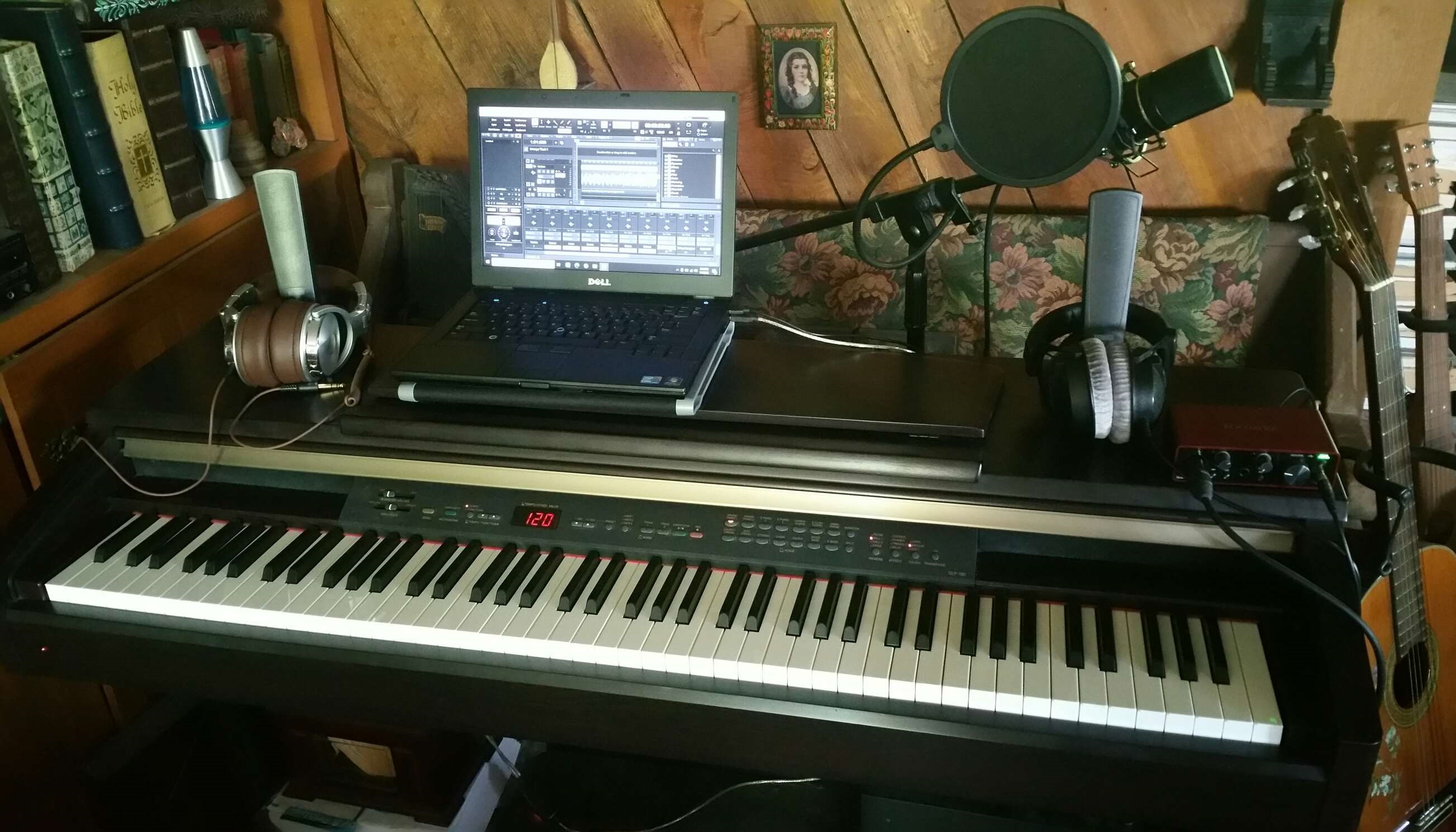
  • Yamaha Clavinova CLP-130 digital piano (2002 model; used, Facebook Marketplace: $200)
  • Focusrite Scarlett Solo 3rd Gen audio interface (used, Craig's List: $25)
  • MXL 770 large diaphragm studio condenser mic with shock mount (factory blemished; Amazon Warehouse: $55.02)
  • LyxPro 15 ft High End XLR cable 4-Conductor Star Quad Microphone Cable - Black (open box; eBay: $10.65)
  • Beyerdynamic DT 770 Pro 80 closed back studio headphones (used; Facebook Marketplace: $70)
  • Floor mic stand with boom arm (used; Facebook Marketplace: $20)
  • Pop filter (new, Black Friday sale; Amazon: $5.34)
  • USB MIDI interface (new, I think I paid about $30 on eBay in 2014)
  • Dell Latitude E6410 laptop, i5, 4 GB RAM upgradable to 8 GB; Craig's List: $100)


  • Other items you might need include:
    -acoustic treatment
    -TRS instrument cable for recording DI instruments, such as electric guitar or anything with a pickup
    -MIDI controllers, such as drum pads, something with a mod wheel or expression pedal, etc.
    -studio monitors and/or open back headphones for mixing

    Unless you're using only analog gear, you will also need software, such as a DAW (Digital Audio Workstation), virtual instruments, and plugins, although there are many quality ones available for free (click the link in this sentence for my list of over 400 free VST instruments and Kontakt libraries and patches).

    If you have a Windows PC, I would recommend Cakewalk by Bandlab, which is a free DAW. I do almost everything with Cakewalk, from recording MIDI from my digital piano to recording and comping vocals (creating a composite vocal track from multiple recordings). I use the ProChannel for mixing, and when it comes to mastering, I use the Bandlab mastering app and then I tweak it using Izotope Ozone Elements. The only thing that I don't do in Cakewalk is selecting MIDI instruments, because it's very cumbersome, compared to other DAWs which are available for Windows (and also for Mac and Linux), such as LMMS or Reaper. I've tried Reaper, I think it's a terrific DAW, but I don't see any reason to spend $60 for a new DAW when I already have two free ones that do what I need them to. I use LMMS to select virtual instruments after recording MIDI in Cakewalk, because it's a very cumbersome process in Cakewalk, compared to other DAWs I have tried. The downsides to LMMS are that it cannot record vocals (or anything else), and it seems to only be capable of recording one MIDI note at a time (which I realized when I tried to record a piano solo via MIDI in LMMS; it might be capable of more than one note, but definitely not 4 notes at a time.) Also, LMMS does not currently allow "gluing" (although it will in an upcoming release) and, worst of all, you can only see one part when you're editing it in Piano Roll Editor (other DAWs have a "ghost" note visible), which means that extensive mathematical calculation is not necessary to accomplish 3-part counterpoint...yes, I've composed three-part counterpoint in LMMS (Birnam Wood Approaches), but I don't recommend it! I'm sure that I could get by entirely with Cakewalk if it wasn't part of my M.O. to audition a lot of instruments before deciding which ensemble will work best in a given piece of music. It just seems to take four times as long to switch instruments in Cakewalk versus LMMS or Reaper. The only other advantages I noticed when I tried Reaper (they offer a generous 60-day free trial), were that it "combs" the ends of MIDI, which gives a more natural-sounding release; that it can edit video (although I didn't try to do that); and that it ... well, that's inconvenient! It slipped my mind. I'll add it later if I think of it. Anyway, Cakewalk and Reaper are very comparable DAWs, and I would recommend either one of them as your primary or only DAW.

    My laptop is below the specs recommended for music production (though just barely), so I have to reboot a lot and I can't run any other apps while producing music, except Notepad (because it takes so few resources). (The main problem is the single-core processor.) You don't have to have a lot of expensive gear to build your home studio. My computer was top of the line a dozen years ago, and it's good enough to do the job (even if I have to reboot before I render/export a .wav file).

    Unless you're primarily a pianist, you almost certainly do not need a digital piano. You can probably get by with a MIDI keyboard. I've been considering getting one with a mod wheel and drum pads, most likely the Novation Launchkey 25. There are many good options, so you should compare what is available and find the one best suited to your needs.

    To help get you started, here is a list of some of the models of MIDI keyboards that are available as of 2022:
  • Akai MPK Mini
  • Akai Professional MPK Mini
  • Alesis V
  • Arturia Keystep
  • Arturia Minilab
  • CME XKey
  • IK Multimedia iRig Keys 2 Mini
  • Keith McMillen QuNexus
  • Korg Microkey Air
  • M-Audio Keystation
  • M-Audio Oxygen
  • M-Audio Oxygen Pro
  • Native Instruments Komplete Kontrol A
  • Native Instruments Komplete Kontrol M
  • Nektar Impact LX
  • Nektar Impact GX
  • Novation Impulse
  • Novation Launchkey
  • Novation Launchkey Mini
  • ROLI Lumi Keys Studio Edition
  • Samson Graphite M

  • Also, make certain that the audio interface has the i/o (ports) that you will need. I nearly chose the PreSonus AudioBox 96 USB instead of the Focusrite Scarlett Solo. It retails for nearly the same price, and it has MIDI i/o as well as two combo ports, instead of one XLR (microphone) port and one TSR port (for an instrument cable), but when I found a used Focusrite Scarlett Solo for $25, that settled it for me (I knew that, if I ever needed more i/o, I could sell my Solo interface and get back what I'd paid for it, so I had nothing to lose).

    I have no complaints about any of my gear, except that I don't have a mod wheel or expression pedal, or an acoustic-electric guitar, or monitors or open back headphones for mixing, and about the challenges of using a computer that is 12 years old now, and that my microphone stand is a little messed up (it came that way). I can confidently recommend everything else that I've purchased.

    Because my tripod microphone stand tends to fall over under the weight of my microphone (once it's weighted down with the pop filter and shock mount, and the boom arm is extended), unless you buy a very expensive and well-balanced microphone stand, I suggest making sandbags out of heavy-duty Ziploc or Glad freezer bags (the kind with the plastic zipper), play sand from your local hardware store (I bought a 50-lb bag for less than $5), and pillow cases or other fabric (pillow cases are the fastest and easiest option). Fill the zip seal bags about 2/3 full of sand, put the sandbags into the pillow cases, and voila! You now have three very inexpensive sandbags to weight down your microphone stand. You can even cover them with pillow cases that match your decor. You can attach Velcro or zippers to the pillow cases so that you can wash them, or simply fold the excess fabric under. I'm considering buying some faux leather from The Dollar Tree to make covers for the sandbags; they could be wiped clean instead of washed, and the faux leather would also provide more protection to prevent the freezer bags from breaking or tearing. They can be sewn shut permanently.


    Acoustic Treatment


    Insofar as acoustic treatment goes, when you're recording vocals, it's best to have absorbent material around you. Have a rug under your feet, and surround yourself with anything from blankets, to mattresses, to acoustic foam. There are many options for building an inexpensive vocal booth at home, including many options that will use things that you already own and which can be taken down and stored if you don't have a dedicated space for a vocal booth.

    I've recently made a very inexpensive vocal booth from a 23" wooden quilting hoop and a quilt that I already owned. (I originally wanted to make something like a very small version of an authentic yurt, the kind with khana, a.k.a. folding lattice walls, a fabric cover (traditionally, wool felt), with the shangyrak, that is, the sturdy round wooden wheel at the crown of the yurt, providing the main support; I read that yurts have really great acoustics, and besides, I'd love to have my recording studio in a yurt! (I've loved traditional yurts ever since I first saw one in 1999.) The idea of the wooden ring as the central support of my vocal booth stayed in my head for a couple years, and finally came back in the form of this incredibly inexpensive idea for a vocal recording booth; a 23" wooden quilting hoop can be purchased online or in a craft store for between $5 and $23, and any sufficiently heavy quilt will do as the walls, however I would definitely recommend a Queen or King size if you're going to try this yourself.) This can be suspended from my ceiling (either with ropes or chains), although this would only work for you if you have a wooden beam or something in your ceiling from which to hang it. One of the advantages is that, much like the Blanket Booth, it has a ceiling, and not just walls.

    It is not necessary that the blankets go all the way to the floor; if your upper body and the area above your head are surrounded by blankets, and you're standing on a thick rug, there's no reason that you need to also surround yourself with blankets from the ground to your waist.

    Here are a few videos on how to build a DIY blanket booth with a PVC frame (I am not affiliated with any of these):
    How To Build a Vocal Booth for UNDER $100 by Patrick Breen (YouTube)
    How To Build a DIY Vocal Booth For Under $200! | Build A Portable Recording Booth by Deity Microphones (YouTube)
    The BEST DIY Vocal Booth On A Budget (FREE BLUEPRINTS) by Musician on a Mission (YouTube)

    It's much less expensive to built it from my ideas; however, if you have no place to suspend it from the ceiling, you're going to need to build a frame instead.

    You may also wish to considering something like the IsoVox2 Home Vocal Booth (retails for $1000) or the t.akustik Vocal Head Booth (retails for around $350-$360, depending on the exchange rate). I actually built a 1 mm to 1 ft scale prototype out of paperboard before I realized that it would be vastly less expensive to build my quilt hoop booth than to spend all the money on acoustic foam to construct something similar to these options (especially because my late mother owned one, and neither my sister nor I are quilters).

    Here is a DIY attempt. However, I must advise you, do not paint acoustic foam. (I am not affiliated with this.)
    The ISOBOX | Vocal Isolation Box | DIY Vocal Booth Inspired by Isovox [Tagalog] by SOUNDCASTER PH (YouTube)
    (I was able to understand this just fine, even though I don't speak or understand Tagalog.)

    If you're recording something like a guitar, on the other hand, a hardwood floor and other reflective surfaces are nice. I advise you to do more research to learn how to best treat the acoustic space that you have, if you plan to record live instruments.

    When producing and mixing, it's best to have the monitors form a triangle with your head as the third point. Be sure your mixing desk is at least a couple feet from the wall and centered in the left-right axis of the room. Be sure to have bass traps in the corners of the room (but only perhaps 2-3 feet from the wall along the other axis of the room). Do your research to determine how much acoustic treatment you need on your walls, floors, and ceiling. Or, do what I do, and mix on headphones (many people believe that this is sacrilege, while others agree that mixing on good headphones is good enough as long as you use a lot of references, that is, different sets of speakers, headphones, and a car stereo...for instance, I use my Beyerdynamic DT 770 Pro 80 closed back headphones, a Tribit XSoundGo Bluetooth speaker, an Altec Lansing ATP3 3-piece speaker system, Skullcandy Ink'd earbuds, and Oneodio Pro-50 studio headphones (which I used for recording and mixing before I got my Beyerdynamic ones), as well as the speakerphone on a Samsung Galaxy Note 4 Smartphone).

    Questions, additions, objections? You can contact me via Shortwhale or via Facebook Messenger.